


Window Garden - Lofi Idle Game
4.6945.00 Reviews
App Specs
- Version
- 2.4.9
- Updated On
- License
- Free
- Downloads
- 1,000,000+
- Developer
- CLOVER-FI Games
- Categories
- Music
- Platform
- Android, iOS
Screenshots



 Analysis by AppCompare
I like games that give a phone a quieter purpose than another stream of alerts, and a small garden is an appealing place to start. Window Garden - Lofi Idle Game is a music game from CLOVER-FI Games built around tending plants at an unhurried pace. I’d think of it as a gentle pastime for spare moments, not a demanding strategy challenge or a substitute for a dedicated music player.
A shared phone, one small garden
On a household tablet or a phone passed around the family, a calm garden can be an easy activity to understand: open the game, spend a little time with the plants, then hand the device back. Its cozy presentation suits a quiet break in a shared room better than a competitive game that asks everyone to keep up. I would still treat the garden as belonging to whoever is playing at the time, rather than assuming that several people can maintain separate spaces on one device.
That distinction matters if siblings or housemates share a screen. Before someone else taps through the garden, it is worth agreeing who is making choices and whether they can change its arrangement or progression. This is simple coordination, not a reason to turn play into a chore: if everyone wants a turn, they can take turns looking and tending without treating the game as a family task list.
Keeping expectations in the right place
The idle format makes it a natural option when you want a low-pressure game to revisit between other activities. It may fit a short pause during the day, or a few minutes winding down at home, without requiring a long session. In my view, that works best when you enjoy seeing gradual progress for its own sake. If you want a game that demands constant decisions, fast reactions, or a clear finish line, this is unlikely to scratch that itch.
Compared with a straightforward music app, the appeal here is that the listening atmosphere comes with a little virtual place to care for. Compared with a more involved gardening or simulation game, the attraction is its easygoing pace rather than detailed management. That trade-off is useful to know: I would choose it for a soft, interactive pause, but choose a music player for dependable background listening while doing something else, or a deeper simulation when I want more systems to master.
Practical points for choosing it
It is free to download, with optional in-app purchases priced from $1.99 to $11.99 per item. I would begin without spending and see whether the basic routine holds my interest; the price range is worth bearing in mind if a child uses the device and might be tempted by purchases. A simple household rule—ask before buying anything—helps keep that boundary clear without making assumptions about the game’s account or family settings.
The game is rated for Everyone, which is reassuring as a broad age label, but I would still make the usual decision based on the person using the phone and the household’s own rules. The rating does not replace checking how a shared device is set up. If a child plays, an adult can agree on turns, keep purchase decisions with the person responsible for the device, and make sure the garden remains a pleasant break rather than another obligation.
Worth Reading Before You Choose

EA SPORTS FC Mobile 26 Is a Bigger Football Game, but It Takes Time

Flipboard Shows What News Apps Must Do Beyond the Feed

Switching to Android Auto Means Rethinking Your Driving Routine

Google Calendar Makes a Crowded Week Easier to Manage

Ludo King Makes the Most of the Minutes Between Plans

Baby Panda World Brings Quick Play to Modern Phones, but Its Game Library Feels Busy
For a useful everyday routine, I’d open it during a transition that already has a little waiting built in—after finishing a task, before dinner, or while taking a brief screen break from work. That makes the idle pace feel like a feature rather than a limitation. I would not rely on it as a timer, reminder, or way to coordinate chores; its value is the quiet garden experience, not household organization.
There are a few practical questions I would settle through ordinary use. Does its pace feel satisfying if I check in only occasionally? Do I enjoy the music as well as the plant-tending? Would I rather keep this as a personal game or share the screen? Those are more useful tests than expecting a particular amount of progress from every visit, because the game’s relaxed appeal depends on whether its rhythm suits you.
The Charm of Virtual Gardening
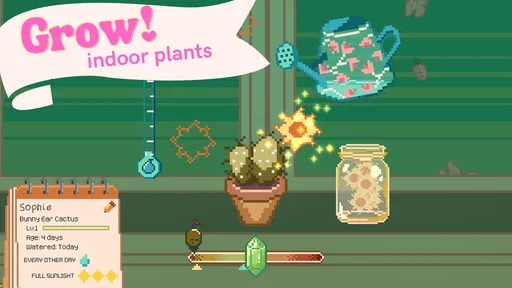
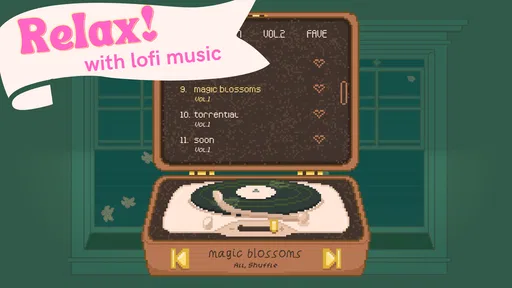
Let’s dive into the essence of Window Garden. Imagine having your own little garden, right on your phone, where you can cultivate a variety of adorable plants while listening to soothing lo-fi tunes. The app does a fantastic job of combining the relaxing elements of gardening with the meditative ambiance of lo-fi beats. It’s like having a tiny oasis in your pocket.
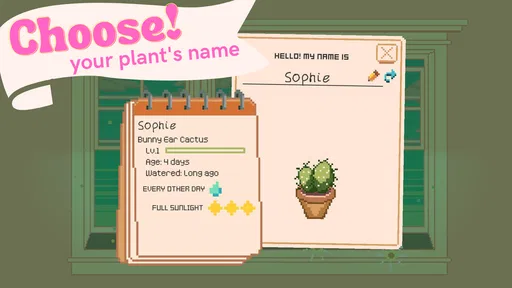
One of the most appealing features is its simplicity. You don’t need a green thumb to get started. The game guides you through planting seeds, watering them, and watching them grow. The visuals are delightfully minimalist, making the experience feel clean and uncluttered. Plus, the animations are smooth, letting you see your plants sway gently as if they're dancing to the music.
Relax and Unwind
The real magic lies in its ability to help you unwind. The lo-fi music is perfectly curated to match the laid-back vibe of the game. It’s like the developers picked tracks that make you want to sit back, sip a cup of tea, and forget the world outside. The combination of visuals and audio creates an immersive experience that’s hard to pull away from.
But let’s not forget the idle aspect. You don’t need to be constantly active to enjoy the game. You can plant your seeds, set the game aside, and return later to see how your garden has blossomed. It's the perfect companion for those who wish to take a break but still want a sense of progress.
Strategies and Growth
While the game is inherently relaxing, it doesn’t mean it’s devoid of strategy. As you progress, you unlock new plants and upgrades, which adds a layer of depth. Deciding which plants to grow and when to water them becomes a fun little puzzle that keeps you engaged. It’s the kind of game that rewards patience and planning.
The satisfaction of seeing your virtual garden flourish is genuinely rewarding. It’s a testament to the developers’ understanding of what makes idle games so addictive. You’re always looking forward to the next upgrade or the next plant to add to your collection.
A Community of Gardeners
Another delightful aspect of Window Garden is its community. The app encourages you to share your garden with friends or discover what others have been growing. It fosters a sense of connection, knowing that while you’re tending to your garden, others are doing the same. It’s like being part of a global gardening club without leaving your home.
Sharing your garden’s progress or getting inspiration from others adds a social element that enhances the overall experience. Plus, the community is generally supportive and full of tips and tricks to help you make the most out of your garden.
Final Thoughts
In a world that constantly demands our attention, Window Garden - Lofi Idle Game offers a much-needed escape. It’s more than just a game; it’s a sanctuary of calm and creativity. Whether you’re a seasoned gamer or someone looking for a moment of peace, this app delivers relaxation and joy in spades.
If you haven’t tried it yet, what are you waiting for? Dive into the tranquil world of Window Garden and let your worries melt away as you nurture your virtual garden. Remember, sometimes it’s the simplest things that bring the most joy.
Who will enjoy this best
I’d recommend it most to someone who likes gentle routines, plant collecting, and music-led downtime, especially if they prefer progress that does not demand constant attention. It has an average rating of 4.6 from around 19,000 ratings, and over 1 million installs, which suggests plenty of players have found the idea appealing. Those figures are useful context, but they do not tell you whether its pace will suit your own habits; a short trial is the fairest test.
It is less suited to anyone looking for demanding tactics, a strong competitive hook, or a music library they can treat as a general-purpose player. The core pleasure is the combination of a little garden and a mellow soundtrack. If that combination sounds like two things you already enjoy, the overlap is its strength. If you only want one of them, a specialist alternative may serve you better.
Small habits that make the idle loop work
I find it helps to give a game like this a place in an existing routine instead of checking it whenever the phone is nearby. A visit after lunch or during a quiet evening pause keeps the experience intentional, while constant checking can make a leisurely loop feel oddly demanding. Since the game is designed around returning after time away, there is no need to turn every spare minute into a gardening session.
Another useful approach is to treat choices about plants and upgrades as small experiments rather than trying to optimize everything immediately. The appeal is partly in watching the space develop, so a decision that reflects what you enjoy seeing can be more satisfying than chasing the next unlock as quickly as possible. If you share the device, agree on who makes those choices; that avoids the mild frustration of finding the garden changed in a way you did not expect.
The app was released on October 29, 2021, and its current version is 2.1.10. It supports Android 7.0 and later, so checking the operating system on an older phone is a practical first step before installing. It is listed as free, though optional purchases mean “free” does not necessarily mean every available item costs nothing. I’d also remember that a music-centered game is best judged with sound at a comfortable level; in a shared room, headphones can make it easier to enjoy without setting the mood for everyone else.
Where it fits among music games
Many music games put timing, score-chasing, or fast input at the center. This one takes a softer route: the music supports a garden routine instead of asking the player to perform to a beat. That makes it a better fit for unwinding than for a quick test of reflexes. In the same way, it differs from a pure idle clicker because its appeal is not only watching a number rise; the visual setting and soundtrack give the progress a more personal feel.
That slower approach has a trade-off. Players who want a clear daily objective or a brisk reward cycle may find the experience too quiet, while those who enjoy ambient play may appreciate not being pushed to compete. I would choose it when I want a screen activity that feels soft around the edges, and pick a rhythm game when I want active concentration. Neither is universally better; they serve different moods.
What to expect over time
One question worth asking before settling in is whether a gradual collection loop is enough to keep you interested after the first novelty passes. The unlocks and upgrades offer reasons to return, but the relaxing structure is the main draw, not an escalating challenge. I would not recommend it to someone who loses interest unless a game continually adds tougher goals. For a player who enjoys tending a space at their own pace, however, that steadiness can be exactly the point.
It is also worth keeping expectations modest about what a virtual garden can do for a busy day. The calm soundtrack and gentle visuals may make a brief pause more pleasant, but the game is still screen time and will not automatically help with focus or stress for everyone. I’d use it as a small leisure break, not as a wellness tool or a replacement for stepping away from the phone when that is what I need.
A considered household choice
For a shared household device, I’d make the decision based on three practical questions: does the intended player enjoy slow progress, can everyone respect whose garden it is, and are purchases handled by the device’s adult owner? Those boundaries are easy to set without assuming special family features. If those points are settled, the game’s gentle tone makes it a reasonable option for relaxed individual turns.
Window Garden is a free music game for Everyone, developed by CLOVER-FI Games, with optional purchases and a clear, cozy identity. I like it most as a quiet companion for short pauses, rather than something I would ask the whole household to play together or depend on for organization. If mellow lo-fi and watching plants develop sound more inviting than chasing scores, it is worth trying; if you need energetic gameplay, deep simulation, or standalone music playback, I’d look elsewhere.
Pros
- Charming visuals with a relaxing lofi soundtrack.
- Easy to learn with intuitive controls.
- Offers stress-free
- idle gameplay.
- Regular updates with new plants.
- Minimal ads for a smoother experience.
Cons
- Limited customization options for gardens.
- Some tasks may feel repetitive over time.
- Requires internet for certain features.
- In-app purchases can be pricey.
- Lacks a competitive or challenge aspect.
FAQs for Window Garden - Lofi Idle Game
What is the primary objective of Window Garden - Lofi Idle Game?
Window Garden - Lofi Idle Game is designed to offer a relaxing and immersive experience where players cultivate a virtual garden. The main objective is to grow and nurture various plants while enjoying calming lofi music. This game is ideal for those looking to unwind and take a break from more intense gaming experiences.
Does Window Garden - Lofi Idle Game require an internet connection?
No, Window Garden - Lofi Idle Game does not require a constant internet connection. You can enjoy the game offline, making it perfect for playing on the go or in areas with limited connectivity. However, certain features like updates or online events may need internet access.
Are there in-app purchases available in Window Garden - Lofi Idle Game?
Yes, Window Garden - Lofi Idle Game offers in-app purchases. These can enhance the gameplay by providing additional items, seeds, or decorations for your garden. While purchases can enrich the experience, they are entirely optional, allowing players to enjoy the game without spending money.
Is Window Garden - Lofi Idle Game suitable for children?
Window Garden - Lofi Idle Game is suitable for all ages, including children. The game’s peaceful nature, simple mechanics, and lack of violent content make it an excellent choice for young players. Parents can feel confident that their children are engaging in a safe and educational activity.
How does the idle mechanic work in Window Garden - Lofi Idle Game?
The idle mechanic in Window Garden - Lofi Idle Game allows plants to grow even when you’re not actively playing. This means you can check in at your convenience to harvest and plant new seeds. The idle feature encourages a relaxed gaming style, perfect for players with busy schedules.


